
I'm reposting this from a STH forum thread...thought some here might be interested. I ordered four of these Samsung SV843 960GB SSDs from Newegg via eBay. They are listed as refurbished.

You are using an out of date browser. It may not display this or other websites correctly.
You should upgrade or use an alternative browser.
You should upgrade or use an alternative browser.
SAMSUNG SV843 2.5" enterprise 960GB SATA III V1 MLC VNAND $169.99
- Thread starter Handruin
- Start date
Stereodude
Not really a
Is this really the forum you intended to post this in? :scratch:
Which consumer SSD are they most closely equivalent to? An 850 Pro?
Which consumer SSD are they most closely equivalent to? An 850 Pro?
Is this really the forum you intended to post this in? :scratch:
Which consumer SSD are they most closely equivalent to? An 850 Pro?
No, thanks. I've moved it to the for sale section.
I'm not sure which consumer drive it matches with. It's based on the 20nm MLC. One Google hit suggests that this drive is the 845DC Pro with a new name for an existing drive. The SV843 is exactly the same drive using 7% of OP instead of 28% OP. If that's true, that means these drives have a controller from the 840 PRO while the NAND is first generation 24-layer 3D V-NAND, instead of the 32-layer solution in the 850 PRO. I'm quoting bits from this article and the comment at the bottom.
Stereodude
Not really a
Interesting. I don't really have anywhere in need of such a drive. Granted, I'm using a 1TB 850 EVO as my DVR drive in my server, but it's only seen 1.38TB of writes so I'm less than 1% of it's rated endurance and it will probably last way beyond its rated lifetime should I actually get there.
I don't expect I'll be anywhere near the WPD with these but it's nice to have some extra durability. I just liked the price given their size and I need some faster storage for my ESXi servers. I'm currently running several VMs on one of my older 1.5TB 5400RPM Samsung drives and I'm starting to notice the lag in them at times.
jtr1962
0
I've been thinking about an external SSD for backup. Very tempting at that price.
jtr1962
0
Well, I bought a pair of them-one for back up and another to eventually use for a boot drive since my 240GB Intel 330 is starting to get full. I figured it'll probably be a while before I'll see a nearly one TB SSD at this price again.

Mercutio
Fatwah on Western Digital
I'm guessing you'll see sub-$200 1TB drives around Xmas 2016, but this is technically an Enterprise drive, and those don't usually come so cheap.
jtr1962
0
I'll be happy to post the SMART data as soon as my drives arrive. Given that I ordered them late yesterday, the earliest I can expect them is tomorrow.
jtr1962
0
Here's the SMART data for my two drives:
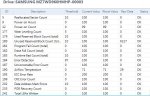
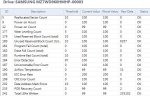
Either the SMART data was wiped or these drives were hardly used. The date of manufacture for both was 2015-02. Serial numbers were S1E4NYAG210688 and S1E4NYAG210727.
Either the SMART data was wiped or these drives were hardly used. The date of manufacture for both was 2015-02. Serial numbers were S1E4NYAG210688 and S1E4NYAG210727.

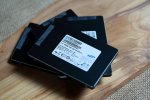
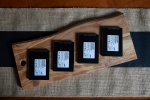
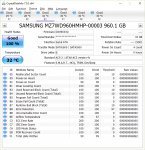
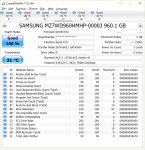
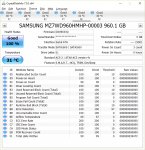
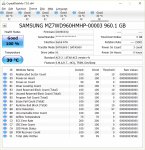
I tested out all four of mine and three of the four appeared to have no data written to them accoring to the smart data whereas the fourth had a very small amount in GB written. I've got three of the four installed in my esxi servers. I ran out of power cables for one of the drives but they all functioned when I connected them to my windows box to mess around with them for a bit.
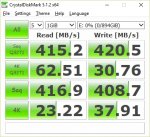
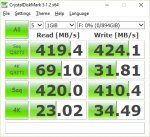
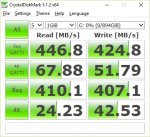
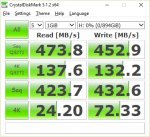
jtr1962
0
If these really are virtually new then this is a steal! I did a benchmark on one of my drives. Performance seems similar to yours:
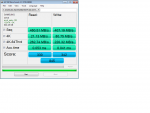
jtr1962
0
I tried the SATA to USB adapter which came with my Samsung 840. It seems to work fine other than the STRs being limited to ~250MB/sec.Some SSDs don't play well as USB external drives. I hope those do.
Anyone know of any USB 3 drive enclosures which can run SSDs at full speed?
jtr1962
0
jtr1962
0
I ordered one. I'll let you know how it works out.
jtr1962
0
Samsung SM843T 480GB for $94.99
Not as good a deal as this in terms of $/GB but still a great price for those looking to spend less than $100 on a drive.
BTW, I ordered another SV843 today. I figured it'll come in handy sooner rather than later.
Not as good a deal as this in terms of $/GB but still a great price for those looking to spend less than $100 on a drive.
BTW, I ordered another SV843 today. I figured it'll come in handy sooner rather than later.
jtr1962
0
My third drive had no writes and only 2 power cycles. It pretty much looks like these were all new. Unsurprisingly, they sold out earlier today.
jtr1962
0
Well, Newegg still has them for $30 more.Knowing they ran out makes my decision easier regarding ordering another. :-D Glad your third one also has minimal usage.
 (Note: price was $179.99 yesterday).
Well, Newegg still has them for $30 more.
Damn you. :-D
Still it's a decent price for roughly 1TB of enterprise SSD space.

timwhit
0
Why are there so many refurb enterprise drives?
jtr1962
0
I'm wondering about that myself, especially in light of the fact these seem virtually brand new. Probably the "refurb" part is due to the fact the drive may have been powered up once or twice by the customer, so it can't be sold as new. But it begs the question why are there so many enterprise drives which were barely used in the first place? Are drives like this just starting to get functionally obsolete now that we have drives with faster interfaces? And did data centers base the number of drives they purchased on HDD failure rates? Perhaps that's what caused a surplus of drives if it turned out the SSDs had a much higher MTBF.

Howell
0
I bet they were sold to a storage vendor who had incompatibilities with the provided firmware. Drives with better firmware are cross shipped to the storage vendor and the incompatible drives are sold at a loss rather than trying to work them back into the supply chain. Check to see if a firmware update is available.
I bet they were sold to a storage vendor who had incompatibilities with the provided firmware. Drives with better firmware are cross shipped to the storage vendor and the incompatible drives are sold at a loss rather than trying to work them back into the supply chain. Check to see if a firmware update is available.
I tried to see if I could update the firmware but was unclear how. The Samsung Magician software didn't recognize the drive and I didn't see firmware files available for download.
jtr1962
0
Same here. These drives have HP in the part number, so it may be they had custom firmware to work in an HP server but perhaps there were issues with that firmware. It might be nice to install whatever firmware Samsung has for SV843 drives but given the inability of Magician to recognize the drive I'm not seeing how that's possible. Best to just leave good enough alone. The drives all test perfectly. At 3.6 WPD there's no way I'm ever wearing these out.
jtr1962
0
The drive enclosure stinks. I'm getting inconsistent speeds between maybe 15 and 125 MB/sec which vary each time I plug it in. I've heard some reviewers say the included cable is lousy but I don't have another USB 3 cable on hand to try. I'm going to the local MicroCenter to see if they have any for a buck or two.
No luck. The cable cost more than the enclosure. I guess I'll try to get my money back.
No luck. The cable cost more than the enclosure. I guess I'll try to get my money back.
Last edited:
The drive enclosure stinks. I'm getting inconsistent speeds between maybe 15 and 125 MB/sec which vary each time I plug it in. I've heard some reviewers say the included cable is lousy but I don't have another USB 3 cable on hand to try. I'm going to the local to the local MicroCenter to see if they have any for a buck or two.
Does the enclosure have a coax power jack you could try?
jtr1962
0
No. It's powered via the USB cable.Does the enclosure have a coax power jack you could try?
I'll see if I can get a refund with minimal hassle. If not, it'll most likely end up in my pile of unused junk.
No. It's powered via the USB cable.
I'll see if I can get a refund with minimal hassle. If not, it'll most likely end up in my pile of unused junk.
Does the enclosure work with normal hard drives, say 2TB? I've had a lot of problems with SSDs on USB.
jtr1962
0
I don't really have any regular 2.5" HDDs to test it with. Technically speaking, the enclosure works in that my computer sees the drive. It's just slow as molasses. The SATA to USB adapter which came with my Samsung 840 seems to work just fine other than the STRs being limited to 250MB/sec. Maybe I'll just make myself some kind of enclosure to put that in seeing that it seems it'll be a crapshoot if I buy another brand of enclosure.Does the enclosure work with normal hard drives, say 2TB? I've had a lot of problems with SSDs on USB.
The drive enclosure stinks. I'm getting inconsistent speeds between maybe 15 and 125 MB/sec which vary each time I plug it in. I've heard some reviewers say the included cable is lousy but I don't have another USB 3 cable on hand to try. I'm going to the local MicroCenter to see if they have any for a buck or two.
No luck. The cable cost more than the enclosure. I guess I'll try to get my money back.
Amazon has a few USB 3 cables around $5 but I don't know if they would be any better. Bummer the case didn't work out with respect to performance.
jtr1962
0
Once you add in the shipping and sales tax you're probably over $10 for the cable. I'll just live with the slower transfer rates on my SATA to USB adapter and build some sort of case for it. It looks like there are a number of other drive enclosures available with UASP but after getting burned once I'm not trying anything else. Not worth my time or aggravation.
Stereodude
Not really a
I have one of those enclosures with an 500GB 850 Evo in it. It performance advertised. Did with an 128 and 256 850 Pro also.
jtr1962
0
I just tried it with my 500GB 840 Evo on the theory maybe it doesn't work well with Enterprise drives. Same issues. If it works for you but not for me then I may have just gotten a bad unit or a bad cable. It's a pity I don't have a spare USB 3 cable to try it with. My former next door neighbor gave me a bunch of cables and other computer stuff they didn't need when they moved but sadly not a single USB 3 cable in the lot.I have one of those enclosures with an 500GB 850 Evo in it. It performance advertised. Did with an 128 and 256 850 Pro also.
jtr1962
0
As strange as it may be, the problems seem to have a been a port incompatibility issue. The drive enclosure uses an AS Media 1153E USB controller. Apparently this doesn't play nice with other USB controllers. I had been trying it on a USB3 port in a USB3 card reader connected to one of the USB 3 internal headers on my M/B. I looked at my motherboard manual and noted that two of the ports in back are ASMedia USB 3 ports. I tried one. Interestingly, ASUS USB 3 boost suddenly had UASP mode available, whereas with the other ports it only had Turbo mode. End result was this:
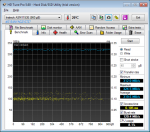
While not quite the 400+ MB/sec I was hoping for, at least the line is straight, not all over the place like it was on other ports. So I guess it works, but it just needs to be connected to an AS Media controller. If not, then the speeds vary each time I plug it in from as low as a few MB/sec up to maybe 125 MB/sec. Also, it dropped in and out on the other ports when I had Turbo mode enabled.
While not quite the 400+ MB/sec I was hoping for, at least the line is straight, not all over the place like it was on other ports. So I guess it works, but it just needs to be connected to an AS Media controller. If not, then the speeds vary each time I plug it in from as low as a few MB/sec up to maybe 125 MB/sec. Also, it dropped in and out on the other ports when I had Turbo mode enabled.
Howell
0
I had been trying it on a USB3 port in a USB3 card reader connected to one of the USB 3 internal headers on my M/B.
Is this some kind of memory card reader that also has a USB port on it, and plugs into a SATA header? Are you getting expected speeds out of this device otherwise?