Flash Memory quality (USB sticks and microSD cards) [v. It all sucks?!?!?]

Stereodude

Not really a
Joined
Jan 22, 2002
Messages
10,865
Location
Michigan
So did the quality of flash memory going into USB sticks and microSD cards go down the toilet or am I just having horrible luck?

I bought a 200GB Lexar 633x micro SD card from B&H, it was bad. Failed a FakeFlashTest run right out of the package. I RMA'd it back to B&H, and got a replacement. The replacement passed a FakeFlashTest run, had some decent CDM results, but ultimately is bad too. Attempting to fill the card with files results in a Error 0x8007045D: The request could not be performed because of an I/O device error. somewhere in the 60-64GB range. I tried filling the card in multiple computers with several different readers and file sets, but it can't be done.

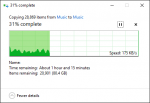
I also bought a 128GB Samsung EVO+ card from B&H. It passed a FakeFlashTest run, but also fails when attempting to fill the card with files with the same Error 0x8007045D: The request could not be performed because of an I/O device error. around the 32GB (base 10) mark. Leaving the card idle, but powered for a few minutes seems to have allowed whatever error the controller encountered to clear enough to allow subsequent writes to continue at 150-200kB/sec for about 100 MB before jumping to ~500kB/sec (see attachment).

I bought a 128GB Lexar S57 USB 3.0 flash drive from Office Depot. It passed a FakeFlashTest run, can be filled successfully, but the performance is very erratic. I copied about 128GB to it under Windows 10 x64 with a USB 3.0 port. I copied files that are a few MB each. At times it moves along at ~40MB/sec. Then it will pretty much stall and the write speed drops to 0 for some number of seconds then slowly rise. Other times it doesn't quite drop to zero, but dips very low. Other times it will hum along at ~40MB/sec for minutes with no slowdowns. Ultimately, it took about 216 minutes to copy the data giving an average write speed of about 9.27MB/sec across the whole copy.

My speculation is that the slowdowns / pauses and write failures are caused by the data writes encountering questionable areas of flash and sometimes the controller can't respond within a timeout window causing a write error. I guess the flash memory not good enough to go into SSDs is finding its way into portable storage rather than being scrapped. Or, maybe I have a knack for getting fake or counterfeit products.

I have to admit I have not yet tried this sort of specific testing on older SD cards or USB flash drives to see if they are similarly afflicted. But, you can bet that I will be doing the same testing over the next few days.

Regardless, I certainly have a very different perspective now on buying a memory card, sticking it in a camera and just assuming it will work.
Samsung 128GB EVO_plus MicroSD.png.
 
I had no issue filling a Sandisk Extreme 64GB USB 3.0 flash drive with no slowdowns as fast as the external USB 2.0 drive could read the source files (~31MB/sec). Then again, it's not a low end drive. It's a high end flash drive. It is also capable of writing faster than I was able to read the files from the source drive, so I may not have been really stressing it. I will try it again at home tonight where I have a faster source available.
 
Last edited:
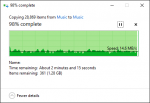
This 128GB PNY USB 3.0 drive I have seems be worse than the Lexar in terms of consistency. No write errors so far, but it's very inconsistent.

PNY 128GB USB 3.0 copy speed.png
 
It seems to me that they're all crap.

I've used USB drives for years as the boot drive on my NAS. Since upgrading from the old 4GB, I've not found one that doesn't eventually pop errors on even the light duty of system logs.

I'll say that name brands do much better than cheapies. I've had several Staples branded USB drives lose too many blocks to be usable.
 
It seems to me that they're all crap.
I suspect you may be right. It seems that inconsistent data transfer speeds may be pretty normal with files of these sizes (4.5MB average). However, the inability to successfully fill the drive with data in a single copy operation (or at all) surprises me.
 
SD have you tried a different card reader and/or computer, as Lunar mentioned in another thread, to see if that was the cause of your troubles? But regardless, you are having some bad luck with cards recently. :(
 
Is there any proprietary manufacturer software loaded on the drives? I saw USB 3 Lexar drives which performed miserably (i.e. speeds of a few MB/sec) due to encryption software. Repartitioning and reformatting the drive fixed that. Also, I've found USB drives are much faster with either FAT32 or ExFAT than with NTFS, especially with writes.

That said, you seem to be having a run of bad luck. I've bought 6 128GB flash drives and a 64GB micro SD card in the last few years. Two of the 128GB drives were Lexar, the rest were PNY, and the microSD card was Sandisk. They all seem to be working normally.
 
SD have you tried a different card reader and/or computer, as Lunar mentioned in another thread, to see if that was the cause of your troubles? But regardless, you are having some bad luck with cards recently. :(
I've tried three different computers and multiple readers. I've used a Lexar USB 3.0 microSDXC reader, a Transcend USB 3.0 microSDXC, and the built in SDXC readers in two laptops using a microSD to SD adapter.
 
Is there any proprietary manufacturer software loaded on the drives? I saw USB 3 Lexar drives which performed miserably (i.e. speeds of a few MB/sec) due to encryption software. Repartitioning and reformatting the drive fixed that. Also, I've found USB drives are much faster with either FAT32 or ExFAT than with NTFS, especially with writes.

That said, you seem to be having a run of bad luck. I've bought 6 128GB flash drives and a 64GB micro SD card in the last few years. Two of the 128GB drives were Lexar, the rest were PNY, and the microSD card was Sandisk. They all seem to be working normally.
I clean formatted all of the drives in my testing. They were tested using exFAT (a horribly wasteful file system, BTW). The 128GB Lexar S57 drive was also tested using NTFS (didn't improve anything). None are encrypted or require the use of any special software. Perhaps the low performing Lexar S57 flash drive perhaps could be suffering from partition alignment issues like early SSDs did. I didn't check that (yet).

I should have two 256GB versions of the Lexar S57 USB 3.0 drives on my porch waiting for me. I ordered the three drives together, but they shipped separately. I'm thinking to return them without opening them based on my experience with the 128GB drive.
 
The partitions seem to be aligned at 0 on the Lexar S57 and the 128GB Samsung EVO+ microSDXC card. The 200GB Lexar microSDXC card that's bad has a partition that starts at 32MB into the card.

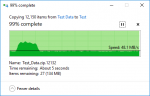
Here's how the 64GB Sandisk CZ80 USB 3.0 stick did with a faster source drive and with my 5MB dummy test files (not the same files as I used earlier at work). It got up to about 130MB/sec for a brief bit. It never dropped below ~40MB/sec.

Sandisk CZ80 64GB 5MB test.png
 
I question the software you are using. Is there a link to D/L?
 
Also, I tested a 64GB Samsung Pro microSDXC. Average write speed for the the whole 64GB of 5MB test files was just a tiny bit under 35MB/sec. No I/O errors. I didn't notice any slowdowns though I didn't sit and watch it too closely.
 
Software for what? I'm copying the test file set with Windows Explorer.

I'm not familiar with that version, but it seems there are a lot of variables.
Generally I buy the fastest write speed cards available as they tend to use better MLC and controllers compared to the single-channel TLC stuff.
 
I'm not familiar with that version, but it seems there are a lot of variables.
Generally I buy the fastest write speed cards available as they tend to use better MLC and controllers compared to the single-channel TLC stuff.
I generally do that to for cards used in cameras. However, when I'm buying a large card to expand the storage in a MP3 player where I only write data to the card a few times I figured buying cheaper cards would be okay. Apparently not.
 
It appears the memory card manufacturers "negative campaign," with SD acting as the unlucky sucker, is working perfectly. Don't buy the cheap cards folks as they suck. Spend 2-3x as much on our "uber-high-ultra-speed-WORKING-memory cards!
 
Well, I have a Sandisk Ultra "200GB" card on the way. I call it "200GB" because it's actually 196GB in base 10 parlance. I guess honesty in drive size advertising has taken another drop. And, I didn't buy it from B&H. We'll see how it fares.
 
My 128GB that I stuck in my phone does fine. It's no speed demon but the I/O is consistent at about 20MB/s going through my phone (it's formatted as part of the internal storage) for large files and I have had no errors yet -- although all I did so far was copy ~70GB of music to it (7.5 thousand MP3s, almost 70 thousand SID files, mod files, and midis).
 
Last edited:
sd, we've been seeing similar things at work with some newer model USB Keys and SD Cards. I had to image a few USB keys last week, and 2 out of 10 keys would only read at 500KBps once you got past half way in the key (16GB and 32GB keys). Two SD Cards read at 50MB/s for the first 4GB, and then dropped to 1MB/s for the remainder of the imaging process... (Kinder sucks when they are only 32GB in size). All operations on the keys/cards were only reading, never writing... So there is something going on with modern designs/firmware.
 
Random thought: Thermal throttling? Though that seems strange on read-only loads...
Our thoughts were the firmware sucks if you try too much async IO on them... They are OK if you are doing synchronous read operations, but if start overlapping read IO requests, they drop in performance significantly... But that doesn't explain the fast start but slow ending? Maybe something to do with the onboard SRAM cache a lot of NAND controllers have in them?
 
sd, we've been seeing similar things at work with some newer model USB Keys and SD Cards. I had to image a few USB keys last week, and 2 out of 10 keys would only read at 500KBps once you got past half way in the key (16GB and 32GB keys). Two SD Cards read at 50MB/s for the first 4GB, and then dropped to 1MB/s for the remainder of the imaging process... (Kinder sucks when they are only 32GB in size). All operations on the keys/cards were only reading, never writing... So there is something going on with modern designs/firmware.
That could be the ECC algorithms kicking in, but it seems unlikely if it does it for the remainder of the process. How many more GB is there after the 4GB mark? You could play with them if you want to experiment and repartition them taking the first 4GB out of the picture and see what they do.

I'm still waiting for my Sandisk "200GB" microSDXC card to arrive. Apparently "Free Expedited Shipping" is code for first class snail mail. On the upside, apparently USPS has a time machine and is still going to deliver it yesterday.
 
sd, we've been seeing similar things at work with some newer model USB Keys and SD Cards. I had to image a few USB keys last week, and 2 out of 10 keys would only read at 500KBps once you got past half way in the key (16GB and 32GB keys). Two SD Cards read at 50MB/s for the first 4GB, and then dropped to 1MB/s for the remainder of the imaging process... (Kinder sucks when they are only 32GB in size). All operations on the keys/cards were only reading, never writing... So there is something going on with modern designs/firmware.
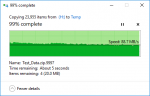
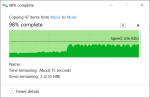
I decided to test the read performance from the 128GB Lexar S57 USB stick. I didn't see any significant slowdowns or drops. It did slow slightly from the start to the end. At the start it was ~105MB/sec. At the end it was ~85MB/sec. I didn't see it drop below 70MB/sec. I was also copying to a spinning drive and it was fairly close to consuming all the disk time, so that might have been a factor also. Here's the somewhat misleading graph from Windows. (Since it's transfer rate vs. percentage complete rather than time slowdowns don't really show up unless they're long)

Lexar S57 128GB Read.png
 
I decided to test the read performance from the 128GB Lexar S57 USB stick. I didn't see any significant slowdowns or drops. It did slow slightly from the start to the end. At the start it was ~105MB/sec. At the end it was ~85MB/sec.
Thanks. I was looking for a good USB key model and the Lexar S57 seems like a decent option. It's not very expensive either.
 
Thanks. I was looking for a good USB key model and the Lexar S57 seems like a decent option. It's not very expensive either.
I wouldn't consider it good. Read performance is okay. Write is so-so.

The Sandisk CZ80 is a good USB flash drive.
 
The Sandisk CZ80 is a good USB flash drive.
It's also twice as expensive as the Lexar S57. I buy them by the dozen for the staff. The S57 is way better than the cheaper Kingston DataTraveler I usually purchase and barely more expensive. I'll go with that.
 
Hold that thought. Phone randomly stopped recognizing the SD card one night. Thinking it's kaput. Really don't want to have to return it, but I dropped forty bucks on it and that's not cheap for a guy like me.
 
It's also twice as expensive as the Lexar S57. I buy them by the dozen for the staff. The S57 is way better than the cheaper Kingston DataTraveler I usually purchase and barely more expensive. I'll go with that.
Well since they're for other people and you probably don't like them too much I'm sure they're fine. If it was for you, I'd suggest better.
 
Well since they're for other people and you probably don't like them too much I'm sure they're fine. If it was for you, I'd suggest better.

Is that Lexar standalone encryption not good for performance or do they use a 3rd party encryption system?
 
I'm still waiting for my Sandisk "200GB" microSDXC card to arrive. Apparently "Free Expedited Shipping" is code for first class snail mail. On the upside, apparently USPS has a time machine and is still going to deliver it yesterday.
It finally arrived today and it seems the 4th time is the charm. It passed FakeFlashTest just fine and I was able to fill it with data without any write errors. Now I'm copying the data off it. Write speed was ~12MB/sec for the lossy music files I wrote. Read speed of those files is in the 65-70MB/sec range.
 
Back
Top