
You are using an out of date browser. It may not display this or other websites correctly.
You should upgrade or use an alternative browser.
You should upgrade or use an alternative browser.
USB Flash Drive
- Thread starter LunarMist
- Start date


CougTek
Hairy Aussie
I'm pretty sure it contains proprietary softwares and therefore is somewhat ~shady~ to share via a direct link. I'm downloading the fourth part of 13 pieces right now...

Mercutio
Fatwah on Western Digital
The most comfortable answer is that it's shady.
CougTek
Hairy Aussie
Criss de Calice de Calvert de Tabanack! Part 13 is no longer available on the server. Sacrament d'Ostie d'Calice!
- Joined
- Nov 15, 2009
- Messages
- 667
mobscene v3.5 While the product may or may not be "shady" placing a link to shady stuff is not illegal -- yet.
Google advanced search is your friend (I excluded anything with manson or mp3 from the results)
Google advanced search is your friend (I excluded anything with manson or mp3 from the results)
- Joined
- Nov 15, 2009
- Messages
- 667
P.S. If there is anyone in authority that has an issue with the link, feel free to remove the post. I won't mind. I just posted it as a service to those that couldn't find it,
Stereodude
Not really a
I like fast writes since I'm impatient. Fast reads are usually a given if you have fast writes. However, I'm not looking for a physically large or $400 USB flash drive either.I'm pretty sure I've seen >100MB/s with spinning disks and USB 3 (reads rather than writes).
Stereodude, what aspects of performance are important to you? Reads vs writes, large files vs small files?
Stereodude
Not really a
I'm a little confused. I've found benchmarks showing the Nobility N005 is a dog with small files, and others that show it's respectable.
This review shows 2.412MB/sec for 4k file writes.
This review shows 0.052MB/sec for 4k file writes.
This review shows 2.577MB/sec for 4k file writes.
This review shows 0.082MB/sec for 4k file writes.
This review shows 2.309MB/sec for 4k file writes.
There doesn't seem to be any method to the madness. The size of the drive doesn't change the numbers, but clearly on some systems it doesn't perform like it does on others.
Stereodude
Not really a
Nevermind, I figured it out. The Pro model is the slow one the non-Pro model is faster with small files...
Of course the non-Pro model is no longer available. The story repeats itself on the Kingston DataTraveler Ultimate 3.0. The G2 drive is slower with small files than the first generation, but G2 drive is the only one available now.
Of course the non-Pro model is no longer available. The story repeats itself on the Kingston DataTraveler Ultimate 3.0. The G2 drive is slower with small files than the first generation, but G2 drive is the only one available now.


Chewy509
Wotty wot wot.
Many of the flash drives are going from 2-bits to 3-bits per cell MLC.
Yes, true with the wonderful side effects of lowered total write cycles (in some cases around 1000 writes), decreased reliability (due to die shrink), and slower performance per bit (3 bit TLC is roughly 3x slower than SLC and 2x slower than MLC - with higher latency).
Truly a wonder to behold!

time
0
I just discovered A-RAM. I picked up one of these to try. Note the use of SLC flash. The 4kB random writes are still terrible (that's on FAT32 with 8kB clusters and Windows write caching disabled), but medium stuff (512kB blocks) seemed pretty good.
I saw about 90% of the claimed figures, i.e. roughly 63MB/s reads and 72MB/s writes. Copying 500MB of mixed (but mainly large) files saw >50MB/s. It cost US$30, which down under is pretty good for that level of performance.
Incidentally, I've decided that for this type of device, AS SSD is fairly pointless except for the auxiliary file copy tests. Crystal is more flexible - you don't have to wait half an hour for it to complete.
I saw about 90% of the claimed figures, i.e. roughly 63MB/s reads and 72MB/s writes. Copying 500MB of mixed (but mainly large) files saw >50MB/s. It cost US$30, which down under is pretty good for that level of performance.
Incidentally, I've decided that for this type of device, AS SSD is fairly pointless except for the auxiliary file copy tests. Crystal is more flexible - you don't have to wait half an hour for it to complete.
time
0
A-RAM Turbo 3 benchmarks
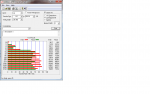

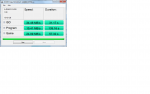
As I said, random writes suck, but sequential access and copying seem pretty decent.
Does anyone have other AS-SSD Copy benchmark results for comparison?
As I said, random writes suck, but sequential access and copying seem pretty decent.
Does anyone have other AS-SSD Copy benchmark results for comparison?
Mercutio
Fatwah on Western Digital
That thing is a little bit better than twice as fast as the 128GB Patriot thumb drive I have here for both reads and writes. Definitely nothing to complain about.
Stereodude
Not really a
Too bad they don't seem available outside of Oz.
The monster 165MB/sec version looks nice too, though the video review I found of it would seem to indicate it's not reliable.
The monster 165MB/sec version looks nice too, though the video review I found of it would seem to indicate it's not reliable.
Stereodude
Not really a
What you get when you buy a "fast" USB 3.0 flash drive: (PNY 128GB Turbo USB 3.0)
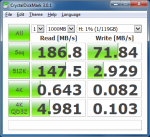
What you would like to get when you buy a fast USB 3.0 flash drive: (Samsung 850 Pro 128GB in USB 3.0 enclosure)
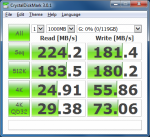
What you would like to get when you buy a fast USB 3.0 flash drive: (Samsung 850 Pro 128GB in USB 3.0 enclosure)
Chewy509
Wotty wot wot.
What you would like to get when you buy a fast USB 3.0 flash drive: (Samsung 850 Pro 128GB in USB 3.0 enclosure)
View attachment 804
Interesting that the writes are quicker with the 4K tests...
Stereodude
Not really a
Writes are faster via the eSATA interface as well. The QD32 4k writes are just as fast as the upper two with SATA II. I'm not sure why USB 3.0 is slower on that test.Interesting that the writes are quicker with the 4K tests...
Stereodude
Not really a
Probably not as reliable as the Samsung which is a standard SSD.How reliable are the USB flash drives though?
Mercutio
Fatwah on Western Digital
How reliable are the USB flash drives though?
Mine definitely get loved to death. I suspect I get 12 - 18 months out of the high capacity drives I carry around for system images and data transfers. I have a small pile of dead soldiers I need to send back to Sandisk or Lexar right now.
Stereodude
Not really a
What happens after 12-18 months? You start to have data integrity issues or they fail to do anything when you plug them into a PC?Mine definitely get loved to death. I suspect I get 12 - 18 months out of the high capacity drives I carry around for system images and data transfers. I have a small pile of dead soldiers I need to send back to Sandisk or Lexar right now.
Mercutio
Fatwah on Western Digital
The most typical thumb drive failure for me seems to start with a "This drive needs to be formatted" message followed by a failure to format.
That's also a fairly common indicator that an SSD has crapped out.
That's also a fairly common indicator that an SSD has crapped out.

sedrosken
Florida Man
Since I now have a USB 3 port, I've been trolling Amazon for a decently-priced, decently-sized USB 3 flash drive. To my surprise, there are 128GB variants priced quite affordably considering their size and speed. A couple are even from Sandisk, Kingston or Corsair. For science, here are some links to prove my claim.
Whenever I have a decent amount of money to my name, I need to take a good long look at these and decide whether one of these are worth my time or should I just get a USB 3 external hard drive and call it good.
Looking at the previous posts, I see that you guys know all this. Still, it surprises the heck out of me.
Whenever I have a decent amount of money to my name, I need to take a good long look at these and decide whether one of these are worth my time or should I just get a USB 3 external hard drive and call it good.
Looking at the previous posts, I see that you guys know all this. Still, it surprises the heck out of me.
What you would like to get when you buy a fast USB 3.0 flash drive: (Samsung 850 Pro 128GB in USB 3.0 enclosure)
View attachment 804
Which external USB 3.0 enclosure are you using? Likes/Dislikes/etc?
I was thinking of doing the same thing ... 850 Pro inside of an external enclosure.
THXs.
Mercutio
Fatwah on Western Digital
Whenever I have a decent amount of money to my name, I need to take a good long look at these and decide whether one of these are worth my time or should I just get a USB 3 external hard drive and call it good.
It's a trade off between capacity, durability and portability. The disk drive will be cheap, but it's also likely to break and you may have issues powering it, depending what you're plugging it in to. I used to carry and use three or four 2.5" drives in external enclosures, but since I have 64 and 128GB thumb drives now, the only reason I use the external enclosure is for pulling drives and doing manual data transfers. I haven't used the 2.5" mechanical drives in probably a year.
It's very easy to get fake flash drives. If your funds are limited, you're probably better off getting a magnetic drive and some kind of case to put it in.
I have a goodly number of the 2TB Seagate Slim drives with the Samsung M9T inside. For the capacity the price is nice at $100. I wish I could trust the USB flash drives, but I'm using Lexar 1000x or 1066x CF cards in a small reader for lesser data transfers. I happen to have a bunch of 64GB cards for the camera bodies and would not buy them just for data transfers.
Stereodude
Not really a
I'm using this one. It seems okay so far. I'm not sure about the UASP support though. It seems Windows 7 doesn't natively support it. I didn't look on the CD that came with the enclosure to see what's on it.Which external USB 3.0 enclosure are you using? Likes/Dislikes/etc?
Stereodude
Not really a
I need to revise this statement. The enclosure did not come with a CD. The Samsung SSD did and I got them mixed up in my head.I didn't look on the CD that came with the enclosure to see what's on it.
time
0
Can't buy PNY locally.
I think A-RAM has long since perished, but nearly 3 years on, I noticed that a supplier still had four 32GB USB sticks (although probably MLC rather than SLC). Picked them up for US$20 each.

I've confirmed the file copy speeds with a stopwatch. Copied a 7.4GB video onto one of them in 45 seconds.
I'm happy.
I think A-RAM has long since perished, but nearly 3 years on, I noticed that a supplier still had four 32GB USB sticks (although probably MLC rather than SLC). Picked them up for US$20 each.
I've confirmed the file copy speeds with a stopwatch. Copied a 7.4GB video onto one of them in 45 seconds.
I'm happy.
Stereodude
Not really a
I picked up a Sandisk Extreme CZ80 64gB stick for $28 during the black Friday promotions from Amazon. I haven't benchmarked it myself yet, but the CDM screenshots in the customer images at Amazon show it's quite respectable in the writing department.
I picked up a Sandisk Extreme CZ80 64gB stick for $28 during the black Friday promotions from Amazon. I haven't benchmarked it myself yet, but the CDM screenshots in the customer images at Amazon show it's quite respectable in the writing department.
I have those 64GB drives as well. They are quite fast depending on the host.
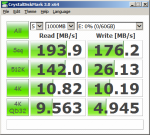
I'm getting 194 MB/sec. reads and 176 MB/sec. writes. on a laptop according to the Crystal.
Attachments
I picked up a Sandisk Extreme CZ80 64gB stick for $28 during the black Friday promotions from Amazon. I haven't benchmarked it myself yet, but the CDM screenshots in the customer images at Amazon show it's quite respectable in the writing department.
I have those 64GB drives as well. They are quite fast depending on the host.
I'm getting 194 MB/sec. reads and 176 MB/sec. writes. on a laptop according to the Crystal.
The device enforces write caching.
Stereodude
Not really a
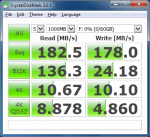
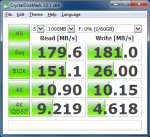
So I got motivated to test it. Here's what I got on a Haswell based laptop running Windows 7 x64.
32bit CDM & 64bit CDM Results:
32bit CDM & 64bit CDM Results: