Cloud Backup

I was able to get Goodsync 10 for only $19 (I had v8.0 and was able to upgrade for a $10 discount). It works very nicely with ACD. Uploaded about 150GB in about 34 hours (about 9.8mpbs average on my Comcast connection). It did error out on about 90 of my 40,000+ files but re-running the sync corrected it. Maybe there were issues with my connection. I also decided to not use the encryption that Goodsync has since I use Amazon photos to get my prints on occasion.

Because the ACD uploader sucks so bad, I am using Goodsync to automatically upload my (new) pictures each day to my free Prime photo storage. I am not using Unlimited ACD, it doesn't seem to be worth the cost compared to Crashplan or Backblaze which offer more features for basically the same $.
 
Last edited:
Based on Clocker's post, I'm trying out a trail version of GoodSync. It seems to be much better than any combination with ACD.dokan, but, then again, it costs money. While only $15, I don't consider it back-up software, and am still pinning my hopes on Arq for that job.
 
So your guys build cloud backup service by your own instead of using the free ones like Google Drive?
 
From a recent support message from a manager at CrashPlan:
While our service is indeed unlimited, any software or storage product has practical limitations. Your use case has pushed up against these practical limitations. Our website highlights "no storage limits or bandwidth throttling," and though this is 100% true, I can understand how your experience does not match our marketing, which is targeted at typical users who make up 99% of our customer base.
 
They're not worried about customer satisfaction of the corner cases. They aren't going to sweat the outliers who they'd rather leave their service.
 
They're not worried about customer satisfaction of the corner cases. They aren't going to sweat the outliers who they'd rather leave their service.
The fact of the matter is that today's corner case is tomorrow's normal user.

People only gather more and more data.
 
He may as well have said "We were losing money on you anyway"
If they'd just come straight out and say that their product does not work as described, apologize, and that they aren't going to be able to fix it soon, I'd feel so much better. They're just giving doublespeak instead.

The funny part is that they keep extending my subscription to make up for these problems. I now have a whole extra year of CrashPlan -- more than enough time to switch over to Arq/ACD.
 
Are you definitely making the switch to Arq/ACD? I wasn't able to get enough satisfaction from Arq to make it work for me in the way that the Crashplan client utility works. I don't love the Crashplan utility because it's finicky and a resource hog but it does work cross platform and it does backup the datasets encrypted the way I want.
 
Arq is definitely clunky, but it seems like they're making improvements with every version.

I don't see the point of sticking with Crashplan when I can't even always retrieve the data. And their support is obviously trash.

I'm going to have quite a bit of overlap time, so I will be able to see if Arq/ACD really makes the cut or not.
 
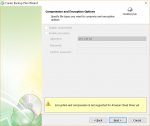
The product looked promising until I got to the point in the configuration of a backup set where this was displayed saying encryption and compression is not supported for Amazon Cloud Drive yet...

no_encrypt.jpg
 
Along those same lines of syncing files, I stumbled into this utility called rclone that supports many of the major cloud storage providers and supports encryption. It's free and open source but a little more crude with respect to using it via command line. I'll try this one a little later but I'm not sure if I'll use it for backing up data since it's more about syncing files than creating backups.
 
After seeing this posted by this Twitter account, I went ahead and laid down money on Arq.

The last line of the article pretty much wrapped it up for me. If CrashPlan isn't interested in protecting their corporate customers....
 
I understand your dislike for the company due to poor service, etc but I'm not fully understanding this concern. I read the article and they said they patched the issue for the customer so what am I missing regarding the last line of the article? Was it just that they have no bug-bounty or that there is some perceived delay in fixing critical bugs? I'm not defending Code42, I'm just not seeing it the same as you are.
 
It's not how you treat someone who someone finds a security flaw in your software and discretely informs you.

In other news, Arq completed it's backup of my files to ACD and everything looks hunky dory. The latest version rescans much faster than older ones did, meaning that it actually picks up new files on my network shares faster than CrashPlan. I did a test restore of over three gigs in less than ten minutes, which was surprisingly fast.
 
Now that I've sung the praises of Arq, it's spent the last full day verifying backups. Keep in mind, this is no worse than Crashplan spending days synchornizing and whatever else not-backing-up tasks it does. But it is annoying.

The good news is that it appears that the Arq developers are aware of the issue and working on it. Considering that every major problem that they find is appropriately addressed, I expect that they will have a solution.
 
I was hoping the date on it said April 1st. That's one way to try and get a yearly fee out of you for a lifetime.
 
Sorry about the size. I don't control the thumbnail....

I waited, just to see if this was their sick joke. Turns out it was another of their server issues. After the connection was down for several hours, it came back and everything is back to normal, minus almost four days of no back-ups. It's estimating over thirty days to catch up.

I'm negotiating to get out of my current subscription.
 
Code42 has made me an offer to buy out the rest of my current subscription, but I'll lose all of my previously backed-up data.

One thing that I'm liking about using ACD is that it feels like my data belongs to me, and I can access it however I want. CrashPlan just puts things in my way.
 
I'm now trying a significant backup from a Synology box onto Backblaze using the client written by Synology. Only about 3TB, but tens of millions of files. All over a slow (6Mbps if I'm lucky) connection.

Jury is still (way) out. I'll give it a month and see what it looks like.
 
I'm now trying a significant backup from a Synology box onto Backblaze using the client written by Synology. Only about 3TB, but tens of millions of files. All over a slow (6Mbps if I'm lucky) connection.

Jury is still (way) out. I'll give it a month and see what it looks like.

Is this from your new NADS?
 
I'm now trying a significant backup from a Synology box onto Backblaze using the client written by Synology. Only about 3TB, but tens of millions of files. All over a slow (6Mbps if I'm lucky) connection.

Jury is still (way) out. I'll give it a month and see what it looks like.

Your RTO will suck.
 
I can imagine they'll migrate at $60 per extra TB.

Something changed on my Crashplan config and my performance increased a bunch. I've finally been able to sync all my data so I'll continue to keep my off-site backups there for now.
 
It sounds like there were a lot of people with a lot of data uploaded. I read forum posts of people with 10+TB. I know that I was guilty of backing up a lot of unnecessary stuff because it was unlimited, but that's a lot.

Right now I'm looking at what the options are for other storage services. Google Nearline and Backblaze B2 are looking promising. Also, a poster elsewhere said that the 1TB limit on G Suite is not enforced; that might be a good option, if true.
 
Also, a poster elsewhere said that the 1TB limit on G Suite is not enforced; that might be a good option, if true.
ROFL... That sounds like a horrible plan. Planning on violating a currently unenforced policy from the start. :bomb:
 
Back
Top